New checkpoints are always an opportunity for new ports. Why am I showing you a picture of my Amiga Technologies A4000T? Because AmigaOS 3.9 is one of them!
Showing posts with label crypto ancienne. Show all posts
Showing posts with label crypto ancienne. Show all posts
Tuesday, April 4, 2023
Crypto Ancienne 2.2: now supported on AmigaOS and classic MacOS/MPW
Friday, July 15, 2022
Crypto Ancienne 2.0 now brings TLS 1.3 to the Internet of Old Things (except BeOS)
Who says you can't teach an old box new tricks? We did it before and we're doing it again. Crypto Ancienne ("Cryanc") is a TLS implementation for pre-C99 beasts and monstrosities featuring carl, a simple curl-like utility that serves as a demonstration command line tool and even as an HTTPS-over-HTTP proxy for suitably configurable browsers. Many operating systems are supported and a number of compilers too (not only gcc going back to version 2.5 and the egcs days, but also clang, MIPSpro, Compaq C and even Metrowerks CodeWarrior). Now, after a lot of late night hacking, screaming and unspeakable acts of programming, tons of bugs are fixed (including a long-standing big-endian issue with ChaCha20Poly1305) and the core has been significantly upgraded such that almost all of the supported platforms now support TLS 1.3.

And what are those supported platforms? Why, here's some of them as they were being cruelly whipped to perform like beaten dogs for your entertainment:
Sunday, February 14, 2021
Make the BeBox great again: TLS 1.2, inetd and more for PowerPC BeOS R5
Many nerds are at least historically aware of the BeOS, which died an untimely death two decades ago this year (when parent Be, Inc. sold out to Palm in 2001 and self-liquidated). Established in 1993 by former Apple exec Jean-Louis Gassée, Be's new OS was meant as a media-savvy alternative to MacOS and Windows, but with POSIX compatibility (largely), a command-line shell option and pervasive cheap multithreading, which is probably its most notable technical feature. It survives in recreated spirit on modern PCs, if not a direct descendent, as the perennially-beta Haiku.


A few nerds, however, will recall that BeOS didn't originally run on x86. In fact, its original architecture was one almost nobody remembers, the AT&T Hobbit, a strange stack-oriented CPU specialized for running C programs. The Hobbit had few takers due to its cost and various technical issues (Apple eventually rejected it for the Newton, leading to the rise of ARM), and when AT&T decided to kill the project in 1993 it nearly killed Be as well, who were using it for their dual-processor prototype wonderbox. After all, the best way to show off your all-singing, all-dancing, all-threading new operating system is with extra CPUs to power it.
Be regrouped around the PowerPC 603, which led to some unique technical issues of its own because the 603 has only three cache coherence states (MEI), making it notionally insufficient for multiprocessing. (This was carried over to the G3 as well, which is really just an evolved 603; the 604 offered a fourth state, and the G4 the full five MERSI states.) With little choice to get a product out the door, Be had to get around this problem with extra hardware to forcibly keep the processor caches synchronized. Be ended up making around 2,000 of the striking blue-and-beige PowerPC BeBoxes, deliberately targetted at technical users, over half of them in the slower dual 66MHz version and later a 133MHz version in the minority. Touches like the zooming LED load meters on the front, built-in MIDI and the customizable Geek Port made them beloved machines by their few owners: author Neil Stephenson, famous for Snow Crash, wrote the essay In The Beginning Was The Command Line with his own BeBox in mind. Pointedly, he declares in the essay that "[w]hat holds Be back in this country is that the smart people are afraid to look like suckers."
Naturally, there's a BeBox here too at Floodgap, a dual 133MHz model with 288MB of RAM running BeOS R5, the last release for PowerPC. And with a little hacking to get around its non-POSIXisms, it now has its own port of Crypto Ancienne with TLS 1.2. The screenshot is what's on the monitor (just press Print Screen anytime and a Targa file is dumped).
The Power Macintosh 7300 under the monitor isn't running BeOS, though it could (not sure if I'd need to remove its 800MHz G4 upgrade card, but it's basically compatible). Aside from PowerBooks (maybe the 3400 could be tricked into booting), PowerPC BeOS would run on pretty much any PCI beige Mac with a 603 or 604 CPU, including the clones. It even boots on systems with aftermarket G3 upgrades. It wouldn't run on an actual beige G3, however, and it wouldn't work on any New World Mac that came after.
And that's the reason why PowerPC BeOS withered after R5: Apple wouldn't provide technical documentation on future models, and Be didn't want to make the company dependent on reverse engineering them. By 1997 the BeBox, only ever a niche product for a niche OS, was discontinued. While Power Computing and other vendors still offered BeOS with their Power Mac clones, the Mac clones were themselves dying out and Be proceeded full speed ahead on an x86-compatible BeOS, releasing the dual-architecture R3 in 1998. PowerPC users became quickly neglected: BeOS never released a "try before you buy" personal edition of BeOS for the Power Macs, and unlike the situation with NeXTSTEP where fat binaries for all architectures were the rule for most software, the majority of developers simply wrote for x86 alone. There was never another browser for PowerPC BeOS other than Be's own NetPositive (while x86 had Opera and Mozilla), which is why I didn't show any BeOS browsers magically empowered by Cryanc in the screenshot, and when BeOS R5.1d0 "Dano" was leaked after Be's demise featuring the improved BeOS Networking Environment (BONE), there was no PowerPC release. At the time LowEndMac observed, "If you feel like Macs are treated like second class citizens, wait until you switch to BeOS — you might soon get the feeling of a fourth class citizen."
Nowadays I'd beg to be a fourth-class citizen. All of the old ftp.be.com archives appear to be gone, along with most of their games and freeware ports. A few packages developed by third parties survive in their original locations, and a few more in the Wayback Machine. There was a egcs port to PowerPC BeOS, but it seems to have evapourated completely, leaving BeIDE and Metrowerks C/C++ as your only development choice. I don't have many software packages but what little I do have for PowerPC BeOS I put on the Floodgap gopher server.
And no Intel crap. Twenty years later x86 has Haiku, which on 32-bit can run all your old x86 R5 apps and new ones besides, so x86 BeOS doesn't need our help. Instead, let's make the BeBox (and PowerPC BeOS generally) great again. And, hey, any of the Hobbit BeBoxes still out there too, being personally aware of a couple. (Especially if anyone wants to send me theirs.)
In future posts I want to talk about some of the other things I've been doing on this BeBox, including patching the SheepShaver Power Mac emulator (fun with page table entries) and writing a gopher client in BeIDE. But today, let's talk about porting Crypto Ancienne to BeOS, writing the only currently existing inetd-like environment for PowerPC BeOS, and why I say R5 is only mostly POSIX compliant.
Crypto Ancienne's core crypto library, ultimately derived from TLSe and libtomcrypt, is written in pre-C99. In fact, version 1.5, the current release, not only adds support for BeOS but also Tru64, IRIX 6.5 and SunOS 4, plus contributed builds for 68K NeXTSTEP, Professional MachTen, Haiku and Solaris 9 along with its previous support for Mac OS X (PowerPC and Intel), AIX, A/UX, Power MachTen, PA-RISC NeXTSTEP and of course Linux and the contemporary BSDs. While gcc 2.x is the most common compiler on these platforms, we also added support for MIPSPro on IRIX, Compaq C on Tru64 and Metrowerks C on BeOS. The core is generally the easiest portion to compile once you find the way the OS likes types and prototypes specified, and Metrowerks C had a good reputation for standards compliance, so other than adding a hack to get function-local variable allocations under 32K (!) that much was uneventful.
The tricky part turned out to be carl, the Crypto Ancienne Resource Loader, the Cryanc demo application and a desperate pun. BeOS has some unusual aspects to its POSIX support, all of which were rectified in Haiku, which built with the default code pretty much unmodified. The needed hacks boil down to the fact that, like the Windows API, standard input, standard output and standard error aren't "normal" filehandles. Let's say you want to check if there's input on an arbitrary file descriptor. There are no less than three non-interchangeable ways in BeOS:
- If it's a socket, you can use select() like normal right-thinking people. There is no poll(), but overall this works like you think it should. This is also true for Winsock.
- If it's a file or pipe, however, you can't. Instead, while this isn't well documented, you can make it non-blocking (something like (void)fcntl(fileno(stdin), F_SETFL, O_NONBLOCK);), and then busywait on the descriptor (return (read(fileno(stdin), &throwaway_char, 0) >= 0); will tell you if input is present). This is somewhat like PeekNamedPipe() in Win32, except that BeOS seems to lack any bespoke function for this purpose, and both require a similar combination of timeouts and alternating calls if you're waiting on a network socket and standard input.
- But, if it's a TTY, it all goes out the window because there's an even more poorly documented ioctl you have to use instead (ioctl(fd, 'ichr', &numcharswaiting)). Haiku even preserves this ioctl for compatibility, though it is obviously discouraged. The non-blocking read() trick might also work but I ended up having to do a combination of both approaches, and even that doesn't work quite right.
On the Crypto Ancienne web browser demo we showed that those computers could self-host their own carl in proxy mode so that they were their own "crypto proxies," assuming a suitable level of web browser support (or coercibility). NetPositive, your only choice on PPC BeOS, resolutely insists on using its own state-of-the-art 40-bit encryption over SSL; I'll see about hacking that later. Still, carl doesn't listen on sockets itself and relies on inetd or inetd-like environments such as xinetd (hi, Rob!) and Jef Poskanzer's micro_inetd, my personal favourite mini-inetd. We demonstrated running it as a proxy with micro_inetd on pretty much every other one of the OSes Cryanc supports, so it would be nice for BeOS to do the same.
Well, it won't come as a surprise to you that BeOS R5 works with none of these. Back in the day, it was even argued it might not be possible to implement inetd at all because sockets aren't shared across fork() (typically, for most inetd-like environments, they fork(), connect the socket to the standard filehandles and launch the dependent program, but this approach is unpossible in BeOS for that reason). Furthermore, you might think that net_server, the team (i.e., process) responsible for sockets in BeOS, would implement something of the sort and you would be wrong; the telnetd and ftpd in R5 are implemented differently. BONE does have a classic inetd but only because it fixes this problem as part of the other significant underlying changes in Dano, none of which were made available for PowerPC.
So this post also introduces inetb (kneeslaps and guffaws), less a port than a heavily multithreaded reimplementation of micro_inetd. Near as I can determine, this is the only inetd-like system that can run on a pre-BONE system. How can we do this if we can't pass the socket to the process we fork() to? Easy: don't pass the socket with fork()! Download it from Be-Power, or follow along with this gist:
- We start up inetb with the port number and the dependent program. Let's use ./inetb 8765 awk '/quit/{exit}{print $1+1}' as a nice interactive example: this takes input, quits if it's quit, and otherwise tries to coerce it to a number and add one to it.
- We listen on the port, initalize our array of iothreadstates (a struct we use to track sockets in flight), set up signal handlers for SIGCHLD and SIGPIPE, and go into an accept() loop. So far, so standard.
- When we get a connection, we assign a new iothreadstate and then use an implementation of popen2() to fork() the dependent process but using pipes, not the socket.
- Now for the BeOS magic. With the dependent process now running and its standard filehandles connected to pipes, we then start two threads, one to read from the process and write to the socket, and another to read from the socket and write to the process. (I have intentionally not implemented standard error: it's convenient to see it for debugging in the terminal you're running inetb from. Exercise left for the reader, but it would be a third set of pipes and a third thread.) The main thread goes back to its accept() loop to take more requests.
- awk terminates, sending a SIGCHLD to the main thread and triggering the signal handler.
- The signal handler reaps the process and based on the PID finds its iothreadstate. It then launches a cleanup thread for that iothreadstate, and goes back to the accept() loop to take more requests.
- The cleanup thread now has to make the threads quit cleanly, since killing them leaves a mess in net_server (killing teams cleans up resources, but not individual threads within a team). It does this by sending a message to both the read-from-process and write-to-process threads. Any message will make them quit.
- For the read-from-process thread, this is sufficient to interrupt its blocking read(). It sees there is a message, and exits gracefully.
- For the write-to-process thread, this is a little more complicated. Even though the socket read should be blocking, in practice signals regularly interrupt it, so we use a select() on the socket to ensure we really do have data to read. There appears to be a bug in BeOS, however, where sending a message sometimes doesn't interrupt select(). We get around this problem by having the select() timeout every 10ms so it can look in its queue, which is less elegant, but better than a tight loop. Anyway, it too sees there is a message, and exits.
- After waiting for both threads to exit, the cleanup thread flushes the socket and closes everything, returns the now spent iothreadstate to the pool and exits itself. Meanwhile, the main thread has already gone on to service other requests. Ain't multithreading great?
- As in standard POSIX, the write-to-process thread sees that the socket is ready but there is no data. Assuming a signal hadn't arrived, this is treated as a disconnect. It kills the dependent process (this is an entire team, so it's safe) and quits.
- awk has just been killed, so a SIGCHLD goes to the main thread, triggering the signal handler.
- The signal handler reaps the process, finds the iothreadstate, and starts the cleanup thread as it returns to the accept() loop.
- The cleanup thread takes down the read thread as well by sending it a message, flushes the socket, closes everything and terminates. Meanwhile, the main thread has already gone on to service other requests. Another stupendous day in Cheap Thread Land!
BeOS isn't perfect, though, as that last sentence will attest. During my testing of inetb I unsettled net_server a lot. You can restart networking from its preference window, but it seemed bad that I had to do this as often as I did. In fact, as an unrelated note, I was able to pretty much wreck the machine every time if I accidentally started CDBurner. I don't have a burner and you'd think it would handle that circumstance, but it doesn't. The machine goes haywire if I'm lucky; it locks up if I'm not. I eventually had to remove it from the Applications menu. More generally, the notion of uids and gids is a veneer and you're pretty much doing everything as the superuser. That means wrong moves hurt.
But don't forget that early Mac OS X had its own weird problems during its earliest versions. BeOS, at least superficially, gives you that similar experience of a POSIX-alike underpinning with better multitasking and memory management, and it was definitely lighter on system resources than early OS X was, too. What NeXT had was Steve Jobs and a longer history with Apple than Jean-Louis Gassée, and while it is variously said that Be's demanded purchase price is what turned Apple away from buying them, I've always thought it was just a cover story for the real deal to get an original Apple founder back. And that worked out handsomely for Apple. But I think BeOS could have served as the next Mac OS at least as well.
Our next BeOS entry will talk about SheepShaver, which you can think of as "Classic" for BeOS. It even runs PowerPC code natively for surprisingly useable performance. But it started crashing incessantly after I upgraded the RAM in my BeBox. Can we fix that? Of course! Find out how next time!
Sunday, November 15, 2020
Fun with Crypto Ancienne: TLS for the Browsers of the Internet of Old Things
The TLS apocalypse knocked a lot of our fun old machines off the Web despite most of them having enough horsepower for basic crypto because none of the browsers they run support modern protocols. Even for Mac OS X, the earliest version you can effectively use for Web browsing is 10.4 because no earlier version has a browser that natively supports TLS 1.2, and for most other old Un*ces and the like you can simply forget it.
 You will notice that we are running carl via micro_inetd on port 8765 in the terminal window at the bottom; the command you'd use, depending on where the binaries are, is something like micro_inetd 8765 carl -p (the -p puts carl into proxy mode). The URL we will use is thus http://localhost:8765/, though note that micro_inetd actually listens on all interfaces, so don't run this on an externally facing system without changes. We have assigned both http and https protocols to that proxy URL and OmniWeb simply assumes that https is a new and different protocol that the proxy will translate for it, which is exactly the behaviour we want. Let's test it on
 Captain Solo Hacker News:
 Excellent! Self-hosted TLS on our own system! Let's try Lobste.rs!
 OmniWeb 2.7 doesn't support CSS or JavaScript, and its SGML-to-RTF renderer (!) is not super quick on an 80MHz computer, but it's remarkable how much actually does work and it's even somewhat useable.
 You'll notice the non-proxied destinations and protocols are off. When these were on, it seemed to get confused, so you should disable both of them unless you know what you're doing. Again, note the terminal window in the background running carl via micro_inetd with the same command, so the URL is once again http://localhost:8765/, and both http and https are assigned to it. You can see Lobste.rs was already working but here it is without the settings window in the way:
 And here's Hacker News:
 There is still no CSS, but there is some modest improvement in the SGML rendering, and the G3 rips right along. I actually rather like Rhapsody; too bad not much natively runs in it.
 Again, we have the Terminal open running micro_inetd and carl (it's actually running the binaries copied off wally!) on port 8765, but since OmniWeb 4 can't resolve domain names on 10.2, the URL is http://127.0.0.1:8765/. Non-proxied destinations and protocols are likewise off. With that, here's Hacker News:
 And here's Lobste.rs.
 The rendering improvements are obvious but so is the significantly increased amount of time to see them. By the way, if you're wondering where the window shadows are, that's because I run Shadowkiller on this iMac. Without it, its pathetic Rage Pro GPU would be brought to its knees in Jaguar.
 You can set up the proxy rules with the interface, but it's simpler just to make a proxy file. If you run Mosaic-CK once, a preferences folder is created in ~/.mosaic (or ~/Library/Mosaic-CK for Mac). Quit Mosaic-CK and inside this folder, create a file named proxy like so:
 However, even though Power MachTen uses gcc 2.8.1 and no modifications to the source code were required, some hosts consistently have issues. Lobste.rs, for example, throws a TLS alert 10 (unexpected message), and some other sites that appear to use a similar server stack do the same. Still, this is substantially more than OS 9 can do on its own. What if we moved this to a "real" Apple Unix -- A/UX?
 Here is 3.0b4 (trying to) displaying Google. I'd love to show you Hacker News, but it can't cope with the reflow and crashes. These crashes don't occur in Mosaic-CK, nor does the <script> spew; I don't know if the Windows version of Mosaic does this but I don't have a Windows port of carl currently.
 3.0b4 also doesn't like getting HTTP/1.1 replies from servers that answer with /1.1 responses even to /1.0 requests. That's probably inappropriate behaviour for them but Mosaic doesn't even try to interpret the reply in those cases. The -s option to carl can fix this for some sites by spoofing /1.0 replies (though the headers are passed unchanged), but some sites won't work even with that.
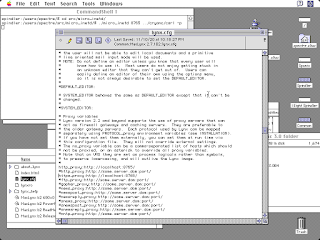 Unfortunately MacLynx still has some other problems which will require a trip to the source code to fix, including not knowing what to do with text/html;charset=utf8 (so no Hacker News). Similarly, carl on A/UX has the exact same failures on the exact same sites in my internal test suite as it did on Power MachTen, which makes me wonder if something in Apple's lower level networking code is responsible (so no Lobste.rs either). But, hey, here's Google over TLS, and there's no script-spew!
 This problem doesn't occur with apps running in Classic under Mac OS X talking to carl running in the Terminal, by the way. That said, if you just want TLS 1.2 on Mac OS X Tiger, you could just run TenFourFox and even get TLS 1.3 as part of the deal.
To date, other than the safe haven of Gopherspace, people trying to solve this problem have generally done so in two ways:
- A second system that does the TLS access for them, subsuming the access as part of a special URL. As a bonus some of these also render the page and send it back as a clickable image; probably the best known is Web Rendering Proxy which works on pretty much any browser that can manage basic forms and imagemaps. Despite the name, however, it is accessed as a special web server rather than as an HTTP proxy, so links and pages also have to be rewritten to preserve the illusion.
- A second system that man-in-the-middles a connection using its own certificate authority; the request is then upgraded. Squid offers this feature, and can act either transparently or as an explicit HTTP proxy. Modern browsers defeat this with certificate pinning, but these browsers wouldn't have that, though you do need to add the proxy as a CA root.
There is a third alternative, however: configure the browser to send unencrypted HTTPS requests to an HTTP proxy. Most browsers don't do this because it's obviously insecure, and none do it out of the box, but some can be taught to. What you want is a browser that doesn't speak HTTPS itself but allows you to define an "arbitrary protocol" (with "finger quotes") to use an HTTP proxy for, and come up with an HTTP proxy on the back end that can accept these requests. Such browsers exist and are even well-known; we will look at a few.
But let's do one better: all these approaches above need a second system. We would like whatever functional layer we have to bolt on to run on the client itself. This is a retrocomputing blog, after all, and it should be able to do this work without cheating.
To that end allow me to introduce Crypto Ancienne, a TLS 1.2 library for the "Internet of Old Things" with pre-C99 compatibility for geriatic architectures and operating systems. What's more, Cryanc includes a demonstration application called carl (a desperate pun on curl) which, besides acting as a command-line agent, is exactly this sort of proxy. You can build it, have it listen with inetd or a small daemon system like micro_inetd, and point your tweaked browser's settings at it. If it's listening on localhost, then no one can intercept it either. Et voila: you just added current TLS to an ancient browser, and you didn't even burst any wineskins.
The browser that allows this nearly perfectly and with fairly good functionality is the venerable OmniWeb, prior to version 4.2. Although the weak HTTPS of the era can be added to OmniWeb with a plugin, and later versions even included it (I'll discuss that momentarily), it is not a core component of the browser and the browser can run without it. OmniWeb started on NeXTSTEP as a commercial product (it's now available for free); version 2.7 ran on all the platforms that NeXTSTEP 3.3 supported including 68K, Intel, SPARC and HP PA-RISC. We have such a system here, an SAIC Galaxy 1100 named astro, which is a portable ruggedized HP Gecko 9000/712 with an 80MHz PA-7100LC CPU and 128MB RAM.
carl builds unmodified on NeXTSTEP 3.3 (cc -O3 -o carl carl.c); the C compiler is actually a modified gcc 2.5. micro_inetd.c just needs a tweak to change socklen_t sz; to size_t sz; and then cc -O3 -o micro_inetd micro_inetd.c. Then we need to configure OmniWeb:
What about later versions? As most readers already know, NeXTSTEP 3.3 became OpenSTEP 4.0 (dropping PA-RISC, boo hiss), and then after Apple bought NeXT, or possibly the other way around, became Rhapsody 5.0. Rhapsody was a curious mixture of a not-quite-faithful facsimile Mac Platinum interface and OpenSTEP underpinnings and was eventually a dead end for reasons we'll mention, but Apple did turn it into a saleable product, i.e., the original Mac OS X Server. OmniWeb 3 runs on Rhapsody, and of course we have such a system here, the best laptop to run Rhapsody on: a PowerBook G3 WallStreet II "PDQ" named (what else?) wally with a 292MHz G3 and 384MB of RAM.
We built carl and micro_inetd on wally in the same way; its cc is actually a cloaked gcc 2.7.2.1. Configuring OmniWeb 3 is a little trickier, however:
Rhapsody was a dead end, as I mentioned: for the Mac OS X Public Beta, Apple instead introduced the new Aqua UI and made other significant changes such that many Rhapsody applications weren't compatible, even though they were both based on early releases of Darwin. Nevertheless, the Omni Group ported OmniWeb to the new platform as well and christened it OmniWeb 4. OmniWeb 4 was both better and worse than OmniWeb 3: it has a much more capable renderer, and even does some CSS and JavaScript, but it is dreadfully slow on some pages such that the 600MHz iMac G3 I ran it on seemed significantly slower than the Wally which ran at less than half the clock speed. In version 4.2 OmniWeb started using the system proxy settings instead of its own (ruining our little trick), and with the availability of Apple WebCore with Safari in Mac OS X Jaguar 10.2 a new and much faster OmniWeb 4.5 came out based on it. If it weren't for the fact I was already a heavy Camino user by that time I probably would have been using it too.
This leaves us with 4.0 as the last OmniWeb we can use carl for, but 4.0 was written for Cheetah 10.0 specifically and seems to have issues resolving domain names beyond Puma 10.1. Not a problem, though, because carl can do that work for it! Here we are working on christopher, a tray-loader strawberry iMac with a 600MHz Sonnet HARMONi G3 upgrade card and 512MB RAM running 10.2.8.
The Omni Group still kindly offers 4.0.6 for download. Drag the application from the disk image to /Applications, but before you run it, open the package in the Finder and go into Contents and Plugins. This is one of the releases that included HTTPS support, so drag HTTPS.plugin to the Trash, empty the Trash and start up the browser. Configuration is much the same as OmniWeb 3 but with one minor change:
So that's it for OmniWeb. What other browsers can we use for this? Surprisingly, an even more famous name: NCSA Mosaic!
NCSA Mosaic was available in multiple forms, including one also maintained by yours truly, Mosaic-CK, which descends from the last Un*x release (2.7b5) and the only NCSA browser for which the source code is known to survive. With the Mosaic-CK changes it builds fine on present-day macOS, Mac OS X, Linux and others. Like OmniWeb it treats HTTPS as a new and different protocol and you can tell Mosaic-CK to use a proxy to resolve it, so here's Mosaic-CK 2.7ck13 on my Raptor Talos II running Fedora 33 showing Hacker News.
https 127.0.0.1 8765 http
http 127.0.0.1 8765 http
Each line must end with a space before the linefeed. Then, with carl running as before, Mosaic-CK will access HTTPS sites through the proxy.
Naturally this doesn't extend the functionality of Fedora 33 very much though (especially since I'm typing this in Firefox on the very same machine), so what about systems that can run Mosaic-CK yet have no other options for modern TLS? One of those is the very operating system Mosaic-CK was originally created for, Tenon's Power MachTen.
Power MachTen is essentially OS X inside-out: instead of running Classic on top of a Mach kernel, Power MachTen and its 68K ancestor Professional MachTen run a Mach kernel on top of the classic Mac OS. I have it installed on bryan, my 1.8GHz Power Mac G4 MDD running Mac OS 9.2.2, which you earlier met when it chewed through another power supply (as MDDs do). Power MachTen has its own internal X server on which it runs AfterStep by default and includes Motif libraries. Here's the MDD viewing Hacker News; notice the classic Mac menu bar and the xterm running micro_inetd and carl.
Most readers will know what A/UX is, Apple's SVR2-based Unix for most 68K Macs with an FPU and MMU. It is notable in that it also includes System 7, allowing you to run both standard Mac apps of the day as well as compile and run binaries from the command line (or use the built-in X server), so we'll run it on spindler, a Quadra 800 clock-chipped to a 38MHz 68040 with 136MB of RAM running A/UX 3.1. There is a Mac version of NCSA Mosaic which for some reason uses a different version number, though the source code is apparently lost. It runs just fine in A/UX's Mac Finder, however, so we'll install NCSA Mosaic for Mac 3.0b4. Instead of the included Apple cc we'll use gcc 2.7.2, which is available from various Jagubox mirrors; carl builds unmodified and micro_inetd just needs the socklen_t fix.
3.0 is the only release of NCSA Mosaic that allows suitable proxy settings, at least on the Mac (2.x used "gateways" fixed to conventional protocols instead). We define http and https protocols, then point them both at localhost:8765 (use "Remote" so that you can fully specify the host and port). carl is already running under micro_inetd in the background (see the CommandShell window).
So, since Mac Mosaic 3.0b4 is persnickety and crashy as heck, do we have an alternative that can be configured in the same way? Not the usual suspects, no: not Netscape, nor MSIE, nor NetShark, nor MacWeb. But incredibly, MacLynx works!
MacLynx is a port of Lynx 2.7 to 68K and PowerPC with (as befits Lynx) very light system requirements. The source code is available, though the binary I'm using here is monkeypatched to fix an issue with an inappropriate Accept-Encoding header it sends. Configuring it is very un-Mac-like: edit lynx.cfg and set http_proxy and https_proxy appropriately, as we are doing here in BBEdit 4.1.
Anyway, this entire exercise demonstrates that with a little care and the right browser you can bolt modern cryptography on and put at least some of these machines back to work. I'm planning to do further ports to IRIX (it builds already but MIPSPro c99 miscompiles some sections that need to be rewritten) and SunOS 4 (needs support for the old varargs.h), and I've got an AlphaPC 164LX running Tru64 here doing nothing as well. I'll have to think about what browser would be appropriate for IRIX other than Mosaic-CK, but Chimera runs nicely on SunOS 4 and the source code is available, and it doesn't need Motif (so it could even be an option for A/UX or older HP/UX). For classic Mac, MacLynx works very well already, so if we can fix its minor deficiencies and make it a little more Mac-like I think it will do even better on 68K systems in particular.
Of course, a still better idea would be to simply integrate native HTTPS support into those classic browsers for which we do have the source code using Crypto Ancienne itself rather than carl as a proxy. That's an obvious goal for a future release of Mosaic-CK.
And, well, maybe this is an opportunity to make Gemini appropriate for retrocomputing. A Gemini client becomes possible now that we have a TLS 1.2 client, and its lighter weight document format would be an especially appropriate choice for these machines. We could even bolt it onto these browsers here by defining a new protocol gemini:// for them and writing a proxy to translate Gemini to HTTP/1.0 and its document format to HTML; you could start with carl itself and make the appropriate modifications. Anyone feel like a weekend project?
Crypto Ancienne is available on Github.
Subscribe to:
Posts (Atom)